
Inappropriate reviews aren’t rare. Google removed 292 million reviews for policy violations in 2025, up from 240 million the year before (Google Trust and Safety Report, 2025). But Google doesn’t catch everything. Plenty of spam, profanity, and personal attacks slip through, and they almost always land with one or two stars. At scale, those few reviews per location add up to a real drag on your overall reputation.
Here’s the good news: most of the questions multi-location teams ask about bad reviews have clear answers. Let’s walk through them.
What is considered an inappropriate Google review?
A review is inappropriate when it breaks Google’s content policies—not just when it’s negative. A harsh-but-honest review about slow service is fair game and stays up. A review that violates the rules is a different story.
Google’s policies prohibit reviews that include:
- Spam and fake content — posts from people who never visited, duplicate reviews, or content posted to manipulate ratings
- Off-topic content — rants about politics, social issues, or anything unrelated to the customer’s experience at that location
- Harassment — reviews that target a specific employee or person with abuse
- Hate speech — content that attacks people based on identity
- Profanity and obscenity — vulgar or offensive language
- Personal information — reviews that leak someone’s private details
- Restricted or illegal content — promotion of regulated goods, services, or activities
For a multi-location team, the tricky part isn’t knowing the rules. It’s applying them consistently across hundreds of profiles, each collecting reviews around the clock.
How do I report an inappropriate Google review?
The standard process looks like this:
- Find the review on the location’s Google Business Profile
- Flag it for removal
- Select the policy reason
- Submit, and wait for Google’s decision
Simple enough for one review. Multiply it across every location, and the cracks show. You’re logging into different profiles, learning Google’s policy language well enough to categorize each violation, filling out forms, and tracking what you submitted and when. The work scales linearly with your footprint, which is to say it doesn’t scale at all.
That’s the problem AI Removal Assistant was built to solve.
How to get a bad review taken off Google (the faster way)
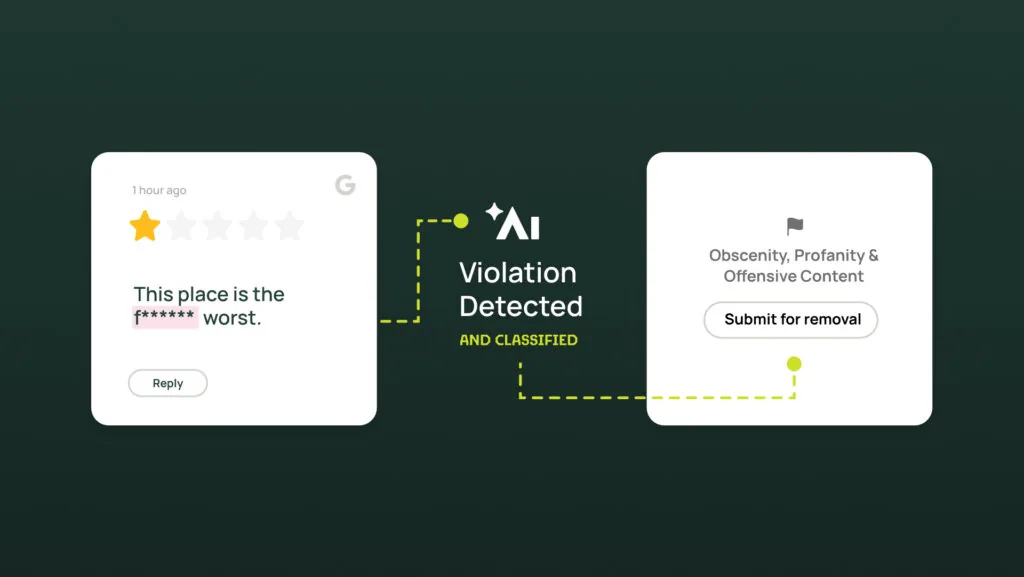
AI Removal Assistant is the first tool that automatically catches Google reviews that break the rules, tells you exactly what’s wrong, and sets up the removal request for you. The work that used to eat an afternoon now takes seconds. Here’s how it works.
1. Flag it automatically
Every incoming review gets checked against Google’s review policies the moment it lands. If something crosses the line, AI Removal Assistant catches it and marks it in your dashboard — no manual scanning, no missed violations, even across hundreds of locations.
2. See the “why”
Click into a flagged review and you’ll get the specifics: which policy it breaks (harassment, spam, hate speech, profanity, and others), the matching category, and a plain-language explanation you can point to. You don’t have to know Google’s policy language by heart — we’ve already done that translation.
3. Submit in two clicks
Once you’re ready, filing the removal request takes two clicks. What used to be a multi-step process from spotting an issue to submitting it now happens in seconds.
4. Let Google decide
The final call belongs to Google. Its team reviews each request, keeps the reviews that follow the rules, and removes the ones that don’t. There’s no guarantee — no tool can promise that — but a clear, well-documented request backed by the right policy citation gives you the best shot at getting a real violation taken down.
The difference for a multi-location team is consistency. Every flagged review gets the same policy-accurate treatment, whether it’s location one or location 400. Want the full breakdown of what qualifies? Our guide on how to remove negative Google reviews walks through Google’s process in detai
How to get a slanderous or defamatory review removed
Slander and defamation sit in a trickier category. A review that’s genuinely false and damaging may violate Google’s policies, but defamation is also a legal question, and Google won’t act as a court. The strongest move is to document the violation clearly and submit a policy-aligned request—the same well-built case that gets any violation removed.
AI Removal Assistant helps here by mapping the review to the specific Google guideline it breaks and drafting the justification for you. You go to Google with a strong, documented request instead of a vague complaint. For reviews that cross into legal territory, that documentation is also a useful record for your own team.
How to respond to a nasty Google review
Not every difficult review qualifies for removal—and most won’t. A one-star review that’s harsh but honest stays up, and ignoring it isn’t an option either. A thoughtful public response shows future customers you take feedback seriously.
But responding to every review, in your brand voice, across every location, is its own scaling problem. That’s where Alchemer’s AI Auto-Responder comes in. It drafts and posts on-brand replies around the clock, so no review sits unanswered for days.
The key is the guardrails. You decide what the AI handles on its own and what it doesn’t. Risky or inappropriate reviews—the profanity, the harassment, the legally sensitive ones—get held back and routed to a team member instead of auto-answered. You automate the routine and keep a human on the cases that need judgment. H&R Block Canada used this approach to hit a 100% review response rate across 900+ locations during peak tax season.
Putting it together across your locations
Managing reviews at scale isn’t one job. It’s three:
- Remove the reviews that break Google’s rules. AI Removal Assistant flags violations and builds the removal request for you, from detection to submission in seconds.
- Monitor for risk automatically. Alchemer Review Signals watches every location and flags inappropriate or risky reviews the moment they post, so nothing slips through.
- Respond to the rest, with guardrails. The AI auto-responder replies in your brand voice and routes risky reviews to a person, so you automate the volume without losing the human touch.
Together, that’s a reputation strategy that holds up whether you manage 10 locations or 1,000. Your rating reflects the experience you actually deliver—not the reviews that broke the rules to get there.
Already an Alchemer Reputation customer? AI Removal Assistant is available now at no extra cost. Log in and try it out today.
Evaluating your options? See AI Removal Assistant in action. Request a demo.